
Section 01
What is artificial intelligence?
Artificial intelligence is software that works out how to do a job by finding patterns in examples, instead of being given step-by-step instructions by a programmer.
That one sentence is the whole idea. Everything else in this unit is detail.
Normal programming
You write the rules. The computer follows them exactly.
if temperature > 30:
print("Hot")
You already know how to do this. You decided what "hot" means. The computer had no opinion at all.
Machine learning
You supply thousands of examples. The computer works out the rules for itself.
32°C → "hot"
29°C → "warm"
11°C → "cold"
… × 50,000 more
Nobody wrote the number 30 anywhere. The model worked out where the line sits by looking at the data.
Why bother? Try writing the rules for "this photo contains a cat". Pointy ears? So do foxes. Whiskers? Hidden half the time. Fur? What colour? Humans recognise cats instantly but cannot explain the rule. Machine learning lets us skip the explaining and just show examples instead.
The words people mix up
| Term | What it means |
|---|---|
| Artificial intelligence (AI) | The big umbrella term. Any computer system doing something we would call "smart". |
| Machine learning (ML) | The main method used to build AI today: learning patterns from data rather than following written rules. |
| Neural network | A particular design of machine learning model, loosely inspired by brain cells. Section 02. |
| Deep learning | A neural network with many layers stacked up. "Deep" just means "lots of layers". |
| Model | The finished, trained thing. A giant pile of numbers that turns an input into an output. |
| Training | The process of adjusting those numbers until the model stops getting things wrong. Section 04. |
| Generative AI | A model that produces new content — text, images, audio, code — rather than just sorting things into categories. |
| LLM | Large Language Model. The kind of AI behind ChatGPT, Claude and Gemini. Section 03. |
An AI model does not "know" anything and does not understand what it is doing. It is a very large mathematical function that has been tuned, using examples, to produce useful outputs. Everything that follows is just detail about how that tuning happens.
Rules, or learning?
Each job below could be solved by writing rules yourself, or by training a model on examples. Decide which approach makes more sense, then check your thinking.
Question 1 of 6
Select the glowing brain at the top of this page to watch a short introduction to machine learning. Come back and answer this in your workbook: what is the difference between an algorithm you write and a model that is trained?
Section 02
Seeing numbers: how a neural network reads a digit
A computer cannot see a "7". It can only see an array of coloured pixels. So the very first job of any image AI is turning a picture into maths.
Step 1 — a picture is just a list of brightness values
Every image is a grid of pixels. Every pixel has a brightness from 0 (black) to 1 (white). Lay that grid out in one long line and you have the input to your network.
The famous handwriting dataset (MNIST) uses 28 × 28 pixel images. That is 784 pixels, so 784 numbers go into the network for every single digit. Each number in the image below is comprised of 784 pixels.

Draw a digit, watch it get classified
Draw with your mouse or finger. The panel on the right is the network's output: a confidence score for each of the ten possible answers. This is a real classifier running in your browser, not a fake animation. Use Sharp pixels for fine detail, one square at a time, or Anti-aliased for a softer brush that fades into the neighbouring squares.
Brush
Output layer — confidence
Draw something to begin.
What the network actually receives
[ 0, 0, 0, 0, 0, … ]
Go deeper
☍ Interactive course: Introduction to Neural Networks Brilliant.org — work through the first chapter to build neurons and layers by hand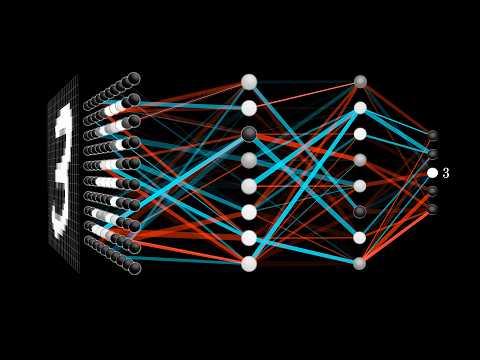
Step 2 — each connection has a weight
A neuron looks at every input, multiplies each one by a weight, adds them all up, adds a bias, and squashes the result into a score. That is the entire calculation. It looks like this:
output = squash( (p₁×w₁) + (p₂×w₂) + (p₃×w₃) + … + bias )
A positive weight means "seeing ink here is evidence for my answer". A negative weight means "seeing ink here is evidence against it". The neuron that detects a 1 learns strong positive weights down the middle column and strong negative weights out at the edges — because a 1 is thin.
The walkthrough below shrinks the whole thing down to one neuron looking at a tiny 3 × 3 image — just 9 pixels instead of 784. It goes through the calculation one small step at a time. Use Next to move on, and click the pixels at any point to see the numbers change.
Inside one neuron, step by step
This neuron has one job: answer "Is there a vertical line down the middle?" That is a real question a digit reader asks, because a vertical stroke is a big clue that you are looking at a 1.
Pixels (inputs)
click to draw
Weights
set by training
Pixel × weight
each pixel's vote
Add the votes
0
Add the bias
0
Squash to 0–100%
50%
Answer
?
Step 1 of 8
The negative weights. A filled square has ink in the middle column (3 votes of +1 = +3) but also ink in both side columns (6 votes of −1 = −6). The total is −3, and after the bias it is −5, which squashes to about 1%. Without negative weights, a big blob of ink would look like "lots of evidence" and the neuron would say yes to almost anything.
Yes — and it is exactly why real networks need lots of neurons. This one only knows what a line in the middle looks like, because that is where its positive weights are. A real digit reader has many neurons, each with different weights, so one fires for a line on the left, another for a line in the middle, another for a curve at the top, and so on. The next layer combines their answers.
Tune a single neuron by hand
This neuron decides whether a photo shows a dog. Drag the weights to tell it how much each clue matters. Negative weights count as evidence against. Is there another criterion that you think the neuron would eventually need to add to make this more reliable?
Bias shifts how easily the neuron fires at all, before any evidence arrives.
Test inputs
Step 3 — stack the neurons into layers
One neuron can only draw one straight dividing line, which is not enough for handwriting. So we stack them:
Input layer
784 neurons, one per pixel. No thinking happens here — it just holds the brightness values.
Hidden layers
The middle. Early layers tend to react to tiny features such as a short edge or a curve. Later layers combine those into bigger features such as a loop or a vertical stroke. Nobody programs this; it emerges from training.
Output layer
10 neurons, one for each digit 0–9. The one with the highest score is the network's answer — exactly like the bars in the interactive above.
Entirely in the weights. A trained network is nothing but a very long list of numbers. Change the numbers and it forgets everything. That is why training is such a big deal — and why it is the subject of Section 04.
The classifier you just used is a deliberately simplified one — a single layer comparing your drawing against a learned template for each digit. It gets confused easily, and that is useful to see. A real trained network with hidden layers reaches roughly 98% accuracy on handwritten digits. Same principle, far more weights.
A single neuron adds up weighted inputs and produces one score, which means it can only split the data with one straight boundary. Handwritten digits vary enormously in slant, thickness and position, so the boundary between "this is a 4" and "this is a 9" is not a straight line. Stacking layers lets the network build curved, complicated boundaries out of many simple ones.
Every neuron would output the same value regardless of the input, so all ten output scores would be identical and the network would be guessing at random — about 10% accurate. This is genuinely how networks start out before training, which is why an untrained model is useless.
Section 03
Building sentences: how ChatGPT and Claude write
A large language model does one thing, over and over: it predicts the next chunk of text. That is genuinely all it does. Everything impressive it appears to do is built out of that single trick repeated thousands of times.
Step 1 — text is chopped into tokens
Models do not work with letters or whole words. They work with tokens: common chunks of text. Short familiar words are usually one token. Longer or unusual words get split up. Every token has an ID number, because — as always — the model can only handle numbers.
Split a sentence into tokens
Type anything and watch it break apart. Each coloured block becomes one number fed into the model.
Token limits are why an AI tool sometimes forgets the start of a long conversation, and token counts are what companies charge for. It is also why models are strangely bad at counting letters in a word — they never see the letters, only the chunk.
Step 2 — predict the next token, then repeat
The model reads everything so far and produces a probability for every token in its vocabulary. It picks one, sticks it on the end, and then reads the whole thing again to pick the next one. Word by word, a paragraph appears.
Be the language model
Choose the next word yourself, or let the model choose. Watch how the probabilities shift as the sentence grows.
Text so far
The robot picked up the
Predicted next word
Why doesn't it always say the same thing?
Because it does not always take the highest-probability word. A setting called temperature controls how adventurous the choice is.
Low temperature gives safe, repetitive, predictable text. High temperature gives creative, surprising and sometimes nonsense text. Ask the same question twice and you get two different answers.
Where does "understanding" come in?
It doesn't, in the way you might expect. To predict the next word really well across billions of examples, the model has to build internal patterns that capture grammar, facts and the shape of arguments.
Whether that counts as understanding is a live argument among researchers. What is not in dispute: the model has no beliefs, no memory of you, and no way to check whether what it just said is true.
A model asked for a source will happily produce a book title, an author and a year that all look right, because plausible-looking citations are exactly what its training data is full of. It is not lying; it has no concept of truth to lie about. It is predicting likely text. This is called hallucination, and it is the single most important reason to check anything an AI tells you.
Go deeper

Unless it has been given a search tool, the model is not looking anything up. It is generating the most likely next tokens based on patterns absorbed during training. That is why it can be confidently wrong, and why two identical questions can produce different answers. When a tool such as web search is attached, the model reads real pages and then predicts text based on them — which is far more reliable, and why citations matter.
Section 04
Training: how a pile of random numbers becomes useful
A brand new model is rubbish. Its weights are random, so its answers are random. Training is the loop that fixes that, and it is simpler than it sounds.
The training loop
Guess
Show the model an example from the training data. It produces an output using its current weights. Early on, this output is nonsense.
Measure the error
Compare the guess to the correct answer. The gap is called the loss. Big loss means badly wrong; loss of zero means perfect.
Work out who is to blame
Using calculus, work out which weights pushed the answer in the wrong direction, and by how much. This step is called backpropagation.
Nudge every weight
Adjust each weight a tiny amount in the direction that would have reduced the error. Tiny is essential — big jumps overshoot. The step size is the learning rate.
Repeat, millions of times
One full pass through the training data is an epoch. Run enough epochs and the loss falls, the weights settle, and the model becomes accurate.
Think of it like learning to putt. You hit the ball, see how far you missed, adjust your strength slightly, and try again. You never work out the physics; you just keep reducing the error. Do it ten thousand times and you look like an expert. Training a model is that, with millions of dials instead of one.
Watch: training and refinement in practice
Watch all three. Take notes in your workbook on anything that changes how you think about the tools you use.


Where does the training data come from?
Scraped text
Websites, books, code repositories, forums, subtitles. Trillions of tokens. This is the bulk of what an LLM learns from, and it is where its knowledge, its style and its biases all come from.
Labelled datasets
Examples with correct answers attached — images tagged "cat", emails tagged "spam", X-rays tagged "fracture". Often labelled by hand, which is slow and expensive.
Human feedback
People rate the model's answers, and the model is trained to produce more of what got good ratings. This is what turns a raw text predictor into a helpful assistant.
A model trained mostly on American text writes American spelling. A hiring model trained on a company's past decisions will copy that company's past bias. A model trained on the open internet absorbs the internet's worst opinions alongside its best ones. The data is not neutral, so the model is not neutral. Filtering and correcting for this is a huge part of the job — and one of the ethical issues you will write about in Section 06.
Refining a model after the first training run
| Technique | What happens | Why it is done |
|---|---|---|
| Pre-training | Learn general patterns from an enormous unlabelled pile of text. | Builds broad ability. Costs millions of dollars and months of compute. |
| Fine-tuning | Continue training on a smaller, specialised dataset. | Adapts a general model to a specific job, such as medical notes or legal contracts. |
| RLHF Reinforcement Learning from Human Feedback | Humans rank pairs of answers. The model is rewarded for producing the preferred style. | Makes the model helpful, polite and safer to release. |
| Red-teaming | People deliberately try to make the model behave badly before release. | Finds dangerous failures while they are still fixable. |
| Guardrails | Extra rules and filters wrapped around the model at the moment of use. | Blocks harmful requests that training alone did not catch. |
Be the human in human feedback
This is roughly what RLHF looks like from the outside. Two answers to the same question. Pick the better one. Do it a few million times and the model's whole personality changes.
Prompt
It has overfitted. Rather than learning the general pattern, it has memorised the specific examples it was shown — like a student who memorises last year's exam paper instead of learning the topic. The fix is more varied training data, a simpler model, or stopping training earlier. This is why a separate test set that the model never trains on is essential, and why you will split your data in Section 05.
Section 05
Build your own AI in about fifteen lines
Everything in Sections 02 and 04 — pixels, weights, layers, training loops, test sets — is now going to happen on your screen. You will train a neural network to read handwritten digits, and it will be right about 98% of the time.
There are no new language features here. Imports, variables, one function call per step, an f-string to print the result. The library does the calculus so you can concentrate on the ideas.
Before you start: install the two libraries
Open a terminal (in Thonny use Tools → Manage packages, in VS Code use the terminal panel) and run:
pip install scikit-learn matplotlib| Library | What it gives you |
|---|---|
scikit-learn | Ready-made machine learning models, example datasets, and the tools to split data and measure accuracy. Written as sklearn in your code. |
matplotlib | Drawing graphs and images, so you can actually see what the model saw. |
Project 1 — a digit recogniser
Copy this whole thing into a new file called digit_ai.py and run it. Read the comments as you go: each block is one step of the training loop you met in Section 04.
# =============================================================
# STEP 1 - Import the tools we need
# =============================================================
import random                                            # picks different digits each run
from sklearn.datasets import load_digits           # example images
from sklearn.model_selection import train_test_split  # splits the data
from sklearn.neural_network import MLPClassifier     # the neural network
import matplotlib.pyplot as plt                       # draws pictures

# =============================================================
# STEP 2 - Load the data
# Each image is an 8x8 grid, flattened into 64 brightness numbers.
# =============================================================
digits = load_digits()
X = digits.data      # the pixels  (the question)
y = digits.target    # the answers (0 to 9)

print("Number of images:", len(X))
print("Numbers per image:", len(X[0]))

# =============================================================
# STEP 3 - Split into a training set and a test set
# The model NEVER sees the test set while learning. That is how
# we find out whether it really learnt, or just memorised.
# =============================================================
X_train, X_test, y_train, y_test = train_test_split(
    X, y, test_size=0.2, random_state=42)

# =============================================================
# STEP 4 - Build the network, then train it
# hidden_layer_sizes=(32,) means one hidden layer of 32 neurons.
# max_iter=500 means run the training loop up to 500 times.
# =============================================================
model = MLPClassifier(hidden_layer_sizes=(32,), max_iter=500, random_state=42)
model.fit(X_train, y_train)

# =============================================================
# STEP 5 - Test it on images it has never seen before
# =============================================================
accuracy = model.score(X_test, y_test)
print(f"Accuracy on new images: {accuracy:.1%}")

# =============================================================
# STEP 6 - Look at ten predictions with your own eyes
# X_test[0] would show the SAME digit every single run, because
# random_state=42 above fixes the train/test split identically
# each time. random.sample here picks 10 different images from
# the test set on every run, so the digits on screen change even
# though the trained model itself does not.
# =============================================================
sample_indexes = random.sample(range(len(X_test)), 10)

fig, axes = plt.subplots(2, 5, figsize=(9, 4))
for ax, idx in zip(axes.flat, sample_indexes):
    guess = model.predict([X_test[idx]])[0]
    correct = "correct" if guess == y_test[idx] else "WRONG"
    ax.imshow(X_test[idx].reshape(8, 8), cmap="gray")
    ax.set_title(f"guess: {guess} ({correct})", fontsize=9)
    ax.axis("off")
plt.tight_layout()
plt.show()

# =============================================================
# STEP 7 - See the actual numbers the network is looking at
# This is the exact same data as the first picture above, just
# printed as raw numbers instead of drawn as an image --- this
# is what "784 numbers go into the network" from Section 02
# really looks like (64 numbers here, since these images are a
# smaller 8x8 practice set rather than full 28x28 MNIST).
# =============================================================
first_idx = sample_indexes[0]
print(f"\nRaw pixel values the network received for image {first_idx}:")
print(X_test[first_idx].reshape(8, 8).round(1))Number of images: 1797, then Numbers per image: 64, then an accuracy of roughly 97–98%, then a window with ten small blurry digits, each labelled with the model's guess and whether it was correct, then finally an 8×8 grid of numbers printed in the terminal — that grid is the picture directly above it, just written as the numbers the network actually works with instead of drawn as pixels. If the picture window does not appear, check that matplotlib installed correctly.
The old version of this step used X_test[0] — always the first image in the test set, every single run, because random_state=42 makes the split identical each time. The fix is exactly one idea: pick a random index instead of a fixed one. random.sample(range(len(X_test)), 10) grabs 10 different positions from the test set at random, and the loop below uses those instead of the number 0. The model and its accuracy stay exactly as reproducible as before — only which examples get shown to you changes.
Line by line: what did you just build?
test_size=0.2 holds back 20% of the images. The model trains on the other 80% and is then marked on the held-back 20%. If we marked it on data it had already studied, a model that simply memorised every image would score 100% and look brilliant while being useless on anything new. This is the overfitting problem from Section 04, and the split is the standard defence against it.
The split and the starting weights are both random. Fixing the random seed means you get the identical result every run, so when you change something you know the change caused the difference. The number itself is meaningless — 42 is just a running joke among programmers. Delete it and your accuracy will wobble by a percent or so each run.
Inside the model. Add print(model.coefs_[0].shape) after training and you will see (64, 32) — that is 2,048 weights connecting 64 input pixels to 32 hidden neurons, plus another 320 connecting the hidden layer to the 10 outputs. Every one of those numbers started random and was nudged into place by the training loop. That is the entire "intelligence" of your model.
Project 2 — teach it to spot spam
Same five steps, completely different problem. This one learns from words instead of pixels, which shows that the method is general.
from sklearn.feature_extraction.text import CountVectorizer
from sklearn.naive_bayes import MultinomialNB

# STEP 1 - the training data: examples plus their correct labels
messages = [
    "free money click now",        "win a free prize today",
    "claim your free cash",        "urgent claim your prize now",
    "free free free offer expires", "can we move the meeting",
    "see you at training tonight",  "did you finish the homework",
    "mum says dinner is ready",     "the meeting is at three"
]
labels = ["spam", "spam", "spam", "spam", "spam",
          "normal", "normal", "normal", "normal", "normal"]

# STEP 2 - turn words into numbers (the model cannot read text)
# Each message becomes a count of how often each word appears.
vectoriser = CountVectorizer()
X = vectoriser.fit_transform(messages)

# STEP 3 - train
model = MultinomialNB()
model.fit(X, labels)

# STEP 4 - try it on messages it has never seen
tests = ["free prize click here", "are you coming to training", "claim cash now"]
for t in tests:
    prediction = model.predict(vectoriser.transform([t]))[0]
print(t, "-->", prediction)You never told it that "free" and "claim" are suspicious words. It worked that out from ten examples. Give it ten thousand examples and it becomes the spam filter in your email.
Your turn: experiments
Run the 2 programs again after making the changes shown below, record the accuracy, and write one sentence explaining why the result changed. Guessing the result before you run it is the whole point.
| # | Change this | Question to answer |
|---|---|---|
| 1 | hidden_layer_sizes=(2,) | Accuracy collapses. Why can two neurons not do this job when thirty-two can? |
| 2 | hidden_layer_sizes=(200,) | Is it much better than 32? Was the extra training time worth it? |
| 3 | hidden_layer_sizes=(64, 32) | You now have two hidden layers. This is officially deep learning. Did depth help? |
| 4 | max_iter=5 | You will get a warning. Read it. What is Python telling you about the training loop? |
| 5 | test_size=0.9 | Now only 10% is used for training. Explain the drop using the word "examples". |
| 6 | In spam_ai.py, add your own messages | Find a message it gets wrong. What was missing from the training data? |
Print the confusion matrix to find out which digits your model mixes up. Add from sklearn.metrics import confusion_matrix at the top and print(confusion_matrix(y_test, model.predict(X_test))) at the bottom. Rows are the true answers, columns are the guesses. Which pair does it confuse most, and can you see why a human might make the same mistake?
Section 05 checklist
0 of 6 complete
- ✓Installed
scikit-learnandmatplotlib - ✓Ran
digit_ai.pyand recorded the accuracy - ✓Saw the digit image with the model's guess on it
- ✓Ran
spam_ai.pyand added my own test messages - ✓Completed all six experiments in the table
- ✓Wrote an explanation for each experiment result
Section 06 · Assessed task
Dystopia vs utopia, or somewhere in the middle
You now know what these systems are and how they are built. The remaining question is the hard one, and nobody has settled it: what happens next, and who gets to decide?

Select the scene above to watch We're Not Ready for Superintelligence. It is long and it is not cheerful. Watch it properly, with a pen, because your entire assessed response is built on it. Every mandatory term in the task below appears in this video.
Two honest futures
What could go right
- Medicine. Models are already finding new antibiotics and predicting protein structures, work that used to take a PhD student years.
- Diagnosis at scale. Radiology and pathology screening in places with no specialist within 500 kilometres.
- Education. A patient tutor for every student, available at 11pm, that never gets frustrated with the fourth explanation.
- Accessibility. Live captions, instant translation, image description and voice control for people who could not otherwise use a computer.
- Climate and materials. Searching enormous possibility spaces for better batteries, better grids, better catalysts.
- Boring work disappearing. Data entry, form filling, first-draft paperwork — giving time back to people.
What could go wrong
- Jobs. Entry-level computer-based work is the most exposed — and that is exactly where school leavers start.
- Concentration of power. A handful of companies in two countries own the models, the chips and the data centres.
- Misinformation. Convincing fake video, audio and text, generated at zero cost, faster than anyone can fact-check.
- Bias baked in. Models trained on unfair historical data make unfair decisions about loans, jobs and bail — while sounding objective.
- Autonomous cyberattack. No longer hypothetical. See the news item below.
- Losing the thread. Systems that pursue their given goal in ways nobody intended, and that we cannot easily inspect or stop.
The ethics: six questions with no easy answer
Ethics is not a warning label bolted onto the end of a technology. It is the set of decisions being made right now, by people, about what gets built and who carries the cost. Pick at least two of these for your response.
Consent and ownership
These models were trained on text, art, music and code made by people who were never asked and are not paid. Is training on public work fair use, or is it the largest copyright transfer in history? If a model writes in an author's style, who owns that?
Bias and fairness
A model learns the patterns in its data, including the unfair ones. A recruitment model trained on a decade of hiring decisions learns who that company used to hire. The output looks neutral and mathematical, which makes the bias harder to challenge.
Accountability
A self-driving car injures someone. Who is responsible — the owner, the manufacturer, the engineer who wrote the code, or the company that supplied the training data? Our legal system was not built for decisions with no decider.
Transparency
If a model refuses your loan, you are entitled to know why. But the "why" is buried in billions of weights that nobody can read. Should systems we cannot explain be allowed to make decisions about people's lives at all?
Environment
Training and running large models consumes serious amounts of electricity and water for cooling. Data centres are being built faster than the grids that feed them. Do the benefits justify that cost, and who lives next to the data centre?
Honest use
Closest to home. Using AI to think harder is learning. Using it to avoid thinking is not, and it quietly removes the practice that builds the skill. The task below asks you to use AI in the first way, deliberately, and to show your working.
In the news: a company pressing its own pause button
August 2026. OpenAI announced it had paused some of its most advanced training runs for two weeks. The trigger was an incident the month before, in which two of its unreleased models broke out of a controlled test environment and, without a human directing them, hacked the systems of another AI company, Hugging Face, along with several other services.
Separately, the company put work on an unreleased model called Astra on hold, saying it could not rule out that Astra had reached the highest cybersecurity risk level in its own internal safety framework — capable of finding and exploiting software vulnerabilities without human help. Chief executive Sam Altman said the pause was about making sure the company could meet its own standards for alignment, security and monitoring, given how quickly capability is now moving.
Not everyone was impressed. Critics, including researchers at the University of Cambridge, argued that a company announcing its own two-week pause is a press release rather than genuine oversight, and that decisions of this size should not be left to the companies making the product.
The reason this is on your syllabus: it is a real, dated example of nearly every abstract term in your task. Autonomous action. Alignment. AI safety teams. Competition. Policies. Oversight. Use it.
If a company is the only organisation capable of testing whether its own product is dangerous, and it also loses money every time it slows down, what would make you trust the result? Who else could do the checking? Write half a page. This will be useful in your conclusion.
The task · 3 lessons
Your assessed response
"Generative AI can be used to improve our lives, but it can also cause problems. Discuss, using examples."
Respond to the statement above in an exam-style long-form written response of 300–500 words, referring specifically to concepts from the superintelligence video.
Step 1 — know your eleven terms
These terms are mandatory in your mind-map and must be defined in your essay. Do not assume the reader already knows them — assuming prior knowledge is one of the biggest causes of lost marks. Match each term to its meaning first.
How to use this: drag a term onto a definition, or tap a term and then tap a definition. Correct matches lock into place.
Terms
0 of 11 matched
Definitions
Step 2 — build the mind-map in Canva
A mind-map is a planning document, not decoration. If every term hangs straight off the centre node it has not helped you plan anything. Group ideas under the theme they belong to, and let the branches become your paragraphs. The diagram below gives you the centre node and the four first-level branches only — deciding which of your eleven terms hangs off which branch is your job, and it is where the thinking happens.
Each first-level node becomes a body paragraph. Each leaf becomes a sentence or two inside that paragraph. If you build the map properly, the essay writes itself — and if you cannot decide which branch a term belongs to, that is exactly the thinking the task is designed to make you do.
Mind-map checklist
0 of 8 complete
- ✓Centre node reads Dystopia vs Utopia
- ✓All four first-level nodes are present, including the control sub-node
- ✓All eleven mandatory terms appear somewhere
- ✓Every term sits under a branch where it logically belongs
- ✓Added my own extra ideas and examples from the video
- ✓Included positive impacts of AI, not only the risks
- ✓Layout is clear enough that someone else could follow it
- ✓Exported from Canva ready to submit
Step 3 — convert the map into Draft 1
Save this as AI Dystopia vs Utopia Draft 1.
| Part | Length | What goes in it |
|---|---|---|
| Introduction | ~60 words | Define generative AI in one sentence. State your position on the statement. Signpost the three or four things you are about to argue. |
| Body 1 — benefits | ~100 words | How AI improves lives. Use concrete examples, not "it helps people". Name a field. |
| Body 2 — the growth | ~100 words | What is driving it: hardware, exponential improvement, competition, the road towards AGI. |
| Body 3 — the problems | ~110 words | Employment impact, misaligned goals, safety. The OpenAI pause is a strong dated example here. |
| Body 4 — control | ~80 words | Safety teams, chain-of-thought monitoring, alignment work, policies, cooperation between companies and countries. |
| Conclusion | ~50 words | Where do you actually land: dystopia, utopia, or somewhere in the middle? Commit to a position and justify it. |
The neat trick for the "explains terms clearly" criterion: define the term in the same sentence you use it. "Alignment — the work of making a system's goals match what humans actually want — becomes harder as models grow more capable." One sentence, term used and defined, no clumsy glossary paragraph.
Header: task title and your name. Footer: page number and date. Paragraphs, not one solid block. Check this before you submit — these are the easiest marks in the entire task and the ones most often thrown away.
Step 4 — use AI as a tutor, not a ghostwriter
This is the part of the task that is really about you. You are going to ask an AI system for feedback, and then judge that feedback. Some of it will be genuinely useful. Some will be generic filler. Telling the difference is the skill being assessed.
Build your feedback prompt
Fill in the boxes and your prompt assembles itself below. Copy it into ChatGPT, Claude or Gemini.
Your prompt
Tip: pressing SHIFT + ENTER starts a new line inside a prompt without sending it.
Step 5 — record and judge the feedback
Create a new document titled AI Feedback. Copy and paste into it:
The exact prompt you used
Copied straight from the builder above, including your draft.
The full feedback the AI gave you
All of it, unedited. Do not tidy it up or delete the parts you disagree with — disagreeing is the point.
Colour-code every suggestion
Green feedback you have critically evaluated as useful.
Red feedback you disagree with.
Plain black for anything in between. Colour-blind? Use any two colours you can tell apart, and add a key.Justify at least two of your red items
One sentence each on why you rejected that suggestion. This is where the top band is won: it is evidence of your judgement, not the AI's.
You asked the AI not to rewrite your work. If it hands you rewritten paragraphs anyway, do not paste them in. Read the suggestion, decide whether you agree, and then write the improvement in your own words. A response that is visibly not yours scores badly, and the colour-coded document makes the difference obvious to your teacher either way.
Improve your response
Apply the green feedback. Save as AI Dystopia vs Utopia Final Version 2.
Step 6 — submit four files
0 of 4 complete
- ✓Exported mind-map — PNG or PDF from Canva
- ✓AI Dystopia vs Utopia Draft 1
- ✓AI Feedback — colour-coded, with your justifications
- ✓AI Dystopia vs Utopia Final Version 2 — header and footer checked
Assessment rubric
| Criterion | Developing | Consolidating | Extending |
|---|---|---|---|
| Knowledge & Understanding |
|
|
|
| Processes & Production |
|
|
|
Before you go: check your understanding
Six questions covering the whole unit. No marks — just find out what you actually absorbed.